Quick Start#
This tutorial demonstrates how to use the aws_organizations Python library to manage and interact with AWS Organizations programmatically.
Import the Library#
[1]:
# First import the library
import aws_organizations.api as aws_orgs
# We need boto_session_manager to set the credential
from boto_session_manager import BotoSesManager
Load AWS Organization Structure#
The library provides two ways to load organization structure:
Direct API Load: Using
aws_orgs.OrgStructure.get_org_structuremethod that calls AWS API to do the following:get the current organization and it’s root account and root id
use root id to get all the accounts and organization units tree structure recursively
create a in-memory
TREEdata structure for better user experience
bsm = BotoSesManager(profile_name="my_management_account_aws_profile")
org_struct = aws_orgs.OrgStructure.get_org_structure(bsm)
Load from Cache: Using serialized JSON data to avoid repeated API calls
org_struct = aws_orgs.OrgStructure.deserialize(json.load(open("org_struct.json")))
[2]:
# Load the pre-built ``OrgStructure`` object
import json

# rich and tabulate is just for pretty printing
from rich import print as rprint
from tabulate import tabulate

org_struct = aws_orgs.OrgStructure.deserialize(json.load(open("org_struct.json")))
Visualize the Organization Structure#
You can dump the organization structure to CSV.
[3]:
print(org_struct.to_csv())
Root    root    o-789   None    r-123
Account root | admin    111111111111    o-789   r-123
OrgUnit root | Security ou-111  o-789   r-123
Account root | Security | sec_login     222222222222    ou-111  r-123
Account root | Security | sec_audit     333333333333    ou-111  r-123
OrgUnit root | Application      ou-222  o-789   r-123
Account root | Application | devops     444444444444    ou-222  r-123
Account root | Application | app-dev    555555555555    ou-222  r-123
Account root | Application | app-test   666666666666    ou-222  r-123
Account root | Application | app-prod   777777777777    ou-222  r-123
You can dump the organization structure to JSON.
It might be time consuming (5-10 seconds) to recursively get all information via AWS API. You can serialize the results to JSON, cache it and read it back (0.01 seconds)
[4]:
rprint(org_struct.serialize())
{
    'entities': [
        {
            'id': 'o-789',
            'name': 'root',
            'type': 'Root',
            'obj': {
                'id': 'o-789',
                'arn': None,
                'feature_set': None,
                'master_account_arn': None,
                'master_account_id': None,
                'master_account_email': None,
                'available_policy_types': [],
                'root_id': 'r-123'
            },
            'parent_id': None
        },
        {
            'id': '111111111111',
            'name': 'admin',
            'type': 'Account',
            'obj': {
                'id': '111111111111',
                'arn': None,
                'name': 'admin',
                'email': None,
                'status': None,
                'joined_method': None,
                'joined_timestamp': None,
                'root_id': 'r-123'
            },
            'parent_id': 'o-789'
        },
        {
            'id': 'ou-111',
            'name': 'Security',
            'type': 'OrgUnit',
            'obj': {'id': 'ou-111', 'arn': None, 'name': 'Security', 'root_id': 'r-123'},
            'parent_id': 'o-789'
        },
        {
            'id': '222222222222',
            'name': 'sec_login',
            'type': 'Account',
            'obj': {
                'id': '222222222222',
                'arn': None,
                'name': 'sec_login',
                'email': None,
                'status': None,
                'joined_method': None,
                'joined_timestamp': None,
                'root_id': 'r-123'
            },
            'parent_id': 'ou-111'
        },
        {
            'id': '333333333333',
            'name': 'sec_audit',
            'type': 'Account',
            'obj': {
                'id': '333333333333',
                'arn': None,
                'name': 'sec_audit',
                'email': None,
                'status': None,
                'joined_method': None,
                'joined_timestamp': None,
                'root_id': 'r-123'
            },
            'parent_id': 'ou-111'
        },
        {
            'id': 'ou-222',
            'name': 'Application',
            'type': 'OrgUnit',
            'obj': {'id': 'ou-222', 'arn': None, 'name': 'Application', 'root_id': 'r-123'},
            'parent_id': 'o-789'
        },
        {
            'id': '444444444444',
            'name': 'devops',
            'type': 'Account',
            'obj': {
                'id': '444444444444',
                'arn': None,
                'name': 'devops',
                'email': None,
                'status': None,
                'joined_method': None,
                'joined_timestamp': None,
                'root_id': 'r-123'
            },
            'parent_id': 'ou-222'
        },
        {
            'id': '555555555555',
            'name': 'app-dev',
            'type': 'Account',
            'obj': {
                'id': '555555555555',
                'arn': None,
                'name': 'app-dev',
                'email': None,
                'status': None,
                'joined_method': None,
                'joined_timestamp': None,
                'root_id': 'r-123'
            },
            'parent_id': 'ou-222'
        },
        {
            'id': '666666666666',
            'name': 'app-test',
            'type': 'Account',
            'obj': {
                'id': '666666666666',
                'arn': None,
                'name': 'app-test',
                'email': None,
                'status': None,
                'joined_method': None,
                'joined_timestamp': None,
                'root_id': 'r-123'
            },
            'parent_id': 'ou-222'
        },
        {
            'id': '777777777777',
            'name': 'app-prod',
            'type': 'Account',
            'obj': {
                'id': '777777777777',
                'arn': None,
                'name': 'app-prod',
                'email': None,
                'status': None,
                'joined_method': None,
                'joined_timestamp': None,
                'root_id': 'r-123'
            },
            'parent_id': 'ou-222'
        }
    ]
}
You can dump the organization structure to Ascii Table.
[5]:
headers, rows = org_struct.to_csv_data()
rprint(tabulate(rows, headers=headers, tablefmt="grid"))
+---------+-------------------------------+--------------+------------+----------+
| Type    | Path                          | Id           | ParentId   | RootId   |
+=========+===============================+==============+============+==========+
| Root    | root                          | o-789        | None       | r-123    |
+---------+-------------------------------+--------------+------------+----------+
| Account | root | admin                  | 111111111111 | o-789      | r-123    |
+---------+-------------------------------+--------------+------------+----------+
| OrgUnit | root | Security               | ou-111       | o-789      | r-123    |
+---------+-------------------------------+--------------+------------+----------+
| Account | root | Security | sec_login   | 222222222222 | ou-111     | r-123    |
+---------+-------------------------------+--------------+------------+----------+
| Account | root | Security | sec_audit   | 333333333333 | ou-111     | r-123    |
+---------+-------------------------------+--------------+------------+----------+
| OrgUnit | root | Application            | ou-222       | o-789      | r-123    |
+---------+-------------------------------+--------------+------------+----------+
| Account | root | Application | devops   | 444444444444 | ou-222     | r-123    |
+---------+-------------------------------+--------------+------------+----------+
| Account | root | Application | app-dev  | 555555555555 | ou-222     | r-123    |
+---------+-------------------------------+--------------+------------+----------+
| Account | root | Application | app-test | 666666666666 | ou-222     | r-123    |
+---------+-------------------------------+--------------+------------+----------+
| Account | root | Application | app-prod | 777777777777 | ou-222     | r-123    |
+---------+-------------------------------+--------------+------------+----------+
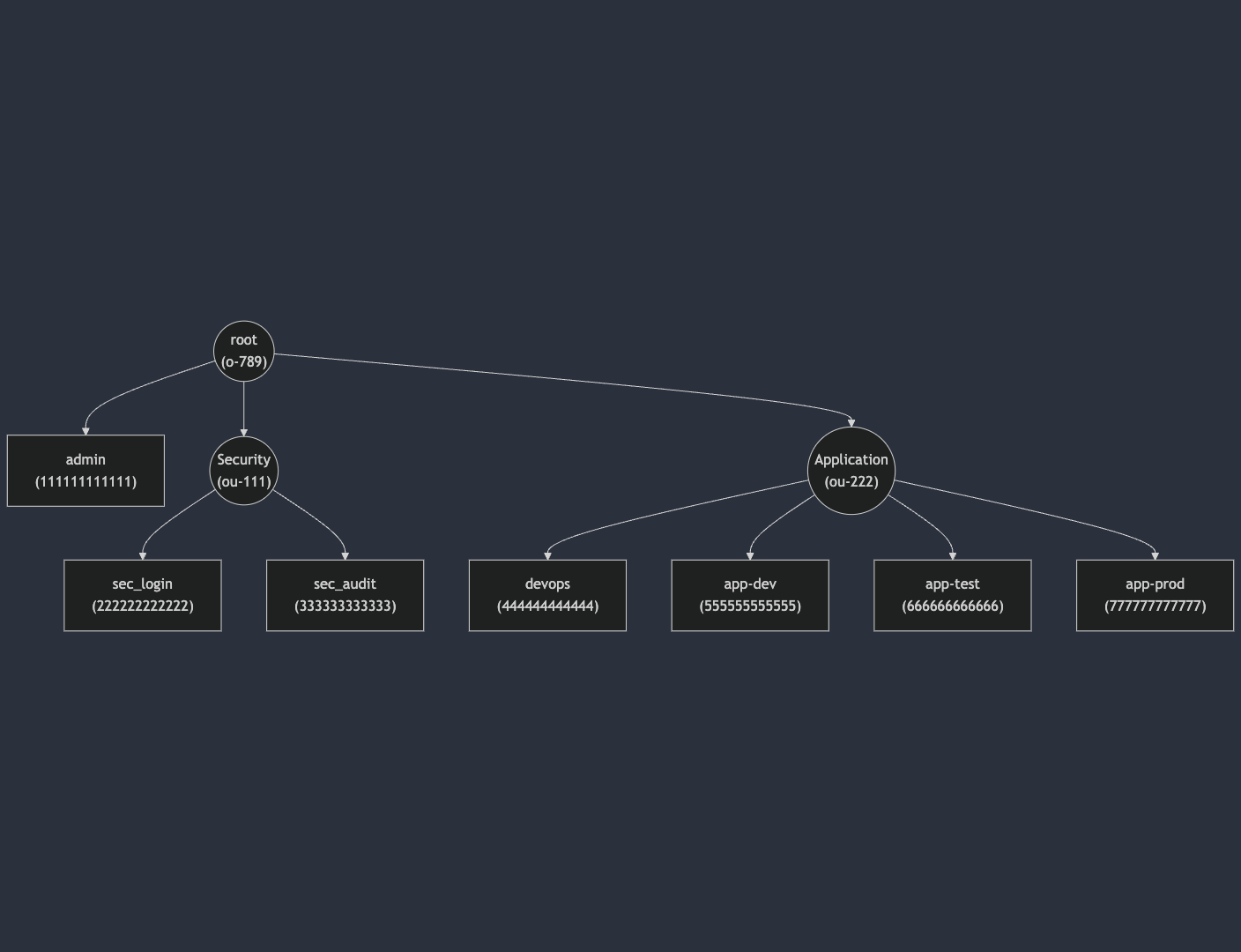
You can dump the organization structure to Mermaid Diagram syntax.
[6]:
print(org_struct.to_mermaid())
graph TD
%% AWS Organization Structure Mermaid Diagram
%% paste the following content to https://mermaid.live/edit to visualize
%% Circle = Organization | Organization Unit
%% Square = AWS Account
N0(("root
(o-789)"))
N1["admin
(111111111111)"]
N2(("Security
(ou-111)"))
N3["sec_login
(222222222222)"]
N4["sec_audit
(333333333333)"]
N5(("Application
(ou-222)"))
N6["devops
(444444444444)"]
N7["app-dev
(555555555555)"]
N8["app-test
(666666666666)"]
N9["app-prod
(777777777777)"]
N0-->N1
N0-->N2
N0-->N5
N2-->N3
N2-->N4
N5-->N6
N5-->N7
N5-->N8
N5-->N9
Here’s the Mermaid Diagram for the organization structure.
Manipulate the Organization Structure#
The library provides several methods to navigate through the organization structure: Account Management
accounts: List direct child accountsall_accounts: List all descendant accounts recursivelyaccounts_names: List names of direct child accountsall_accounts_names: List names of all descendant accounts
Organization Unit Management
org_units: List direct child OUsall_org_units: List all descendant OUs recursivelyorg_units_names: List names of direct child OUsall_org_units_names: List names of all descendant OUs
Iterate AWS Accounts#
Only direct child accounts in this node.
[7]:
rprint(org_struct.root.accounts)
[
    Account(
        id='111111111111',
        arn=None,
        name='admin',
        email=None,
        status=None,
        joined_method=None,
        joined_timestamp=None,
        root_id='r-123'
    )
]
Recursively iterate all accounts
[8]:
rprint(org_struct.root.all_accounts)
[
    Account(
        id='111111111111',
        arn=None,
        name='admin',
        email=None,
        status=None,
        joined_method=None,
        joined_timestamp=None,
        root_id='r-123'
    ),
    Account(
        id='222222222222',
        arn=None,
        name='sec_login',
        email=None,
        status=None,
        joined_method=None,
        joined_timestamp=None,
        root_id='r-123'
    ),
    Account(
        id='333333333333',
        arn=None,
        name='sec_audit',
        email=None,
        status=None,
        joined_method=None,
        joined_timestamp=None,
        root_id='r-123'
    ),
    Account(
        id='444444444444',
        arn=None,
        name='devops',
        email=None,
        status=None,
        joined_method=None,
        joined_timestamp=None,
        root_id='r-123'
    ),
    Account(
        id='555555555555',
        arn=None,
        name='app-dev',
        email=None,
        status=None,
        joined_method=None,
        joined_timestamp=None,
        root_id='r-123'
    ),
    Account(
        id='666666666666',
        arn=None,
        name='app-test',
        email=None,
        status=None,
        joined_method=None,
        joined_timestamp=None,
        root_id='r-123'
    ),
    Account(
        id='777777777777',
        arn=None,
        name='app-prod',
        email=None,
        status=None,
        joined_method=None,
        joined_timestamp=None,
        root_id='r-123'
    )
]
Iterate AWS Organization Units#
Only direct child OUs in this node.
[9]:
rprint(org_struct.root.org_units)
[
    OrganizationalUnit(id='ou-111', arn=None, name='Security', root_id='r-123'),
    OrganizationalUnit(id='ou-222', arn=None, name='Application', root_id='r-123')
]
Recursively iterate all OUs
[10]:
rprint(org_struct.root.all_org_units)
[
    OrganizationalUnit(id='ou-111', arn=None, name='Security', root_id='r-123'),
    OrganizationalUnit(id='ou-222', arn=None, name='Application', root_id='r-123')
]
Access an Organization Unit or Account#
You can use either the id or the name to access the OU or account.
[11]:
rprint(org_struct.get_node_by_id("ou-222"))
Application (OrgUnit 'ou-222')
[12]:
rprint(org_struct.get_node_by_name("Application"))
Application (OrgUnit 'ou-222')
[13]:
rprint(org_struct.get_node_by_id("777777777777"))
app-prod (Account '777777777777')
[14]:
rprint(org_struct.get_node_by_name("app-prod"))
app-prod (Account '777777777777')
Organization Unit is also A Node#
Since organization unit is also a tree node, the following methods are also available for an organization unit:
accounts: direct child accountsorg_units: direct child organization unitsall_accounts: recursively get all accountsall_org_units: recursively get all organization units
[15]:
ou_app = org_struct.get_node_by_name("Application")
[16]:
rprint(ou_app.accounts)
[
    Account(
        id='444444444444',
        arn=None,
        name='devops',
        email=None,
        status=None,
        joined_method=None,
        joined_timestamp=None,
        root_id='r-123'
    ),
    Account(
        id='555555555555',
        arn=None,
        name='app-dev',
        email=None,
        status=None,
        joined_method=None,
        joined_timestamp=None,
        root_id='r-123'
    ),
    Account(
        id='666666666666',
        arn=None,
        name='app-test',
        email=None,
        status=None,
        joined_method=None,
        joined_timestamp=None,
        root_id='r-123'
    ),
    Account(
        id='777777777777',
        arn=None,
        name='app-prod',
        email=None,
        status=None,
        joined_method=None,
        joined_timestamp=None,
        root_id='r-123'
    )
]
[ ]: